
Combine PDF Files can be a hassle when you’re using desktop software that requires installation, licensing, or updates. Fortunately, there’s a quicker, simpler way to get it done — right from your browser. In this guide, we’ll walk you step-by-step on how to merge PDF online without software using the powerful, free PDF tools available on Sumant Studio.
Did you know? With Sumant Studio, you can complete your tasks effortlessly — no installs, no signups, and absolutely no hidden costs.
Why Merge PDFs or Combine PDF Files?
Whether you are a student or a professional, at some point or the other you might have searched on the internet for ‘How to Combine PDF Files’, ‘How to Merge PDF’. We all know that it offers huge benefits:
- Saves time and effort
- Keeps files organized and consolidated
- Makes document sharing seamless
Online tools provide the flexibility to work from any device, anytime, anywhere. And best of all? No need to install bulky software. It’s not only convenient but environmentally friendly, reducing the need for physical paperwork.
Step-by-Step Guide to How to Merge PDF or Combine PDF Files
Let’s know how to merge pdf Online Without installing any Software, No hidden fees or subscriptions, without an account
Follow these simple steps to merge your PDFs using Sumant Studio‘s free PDF tool:
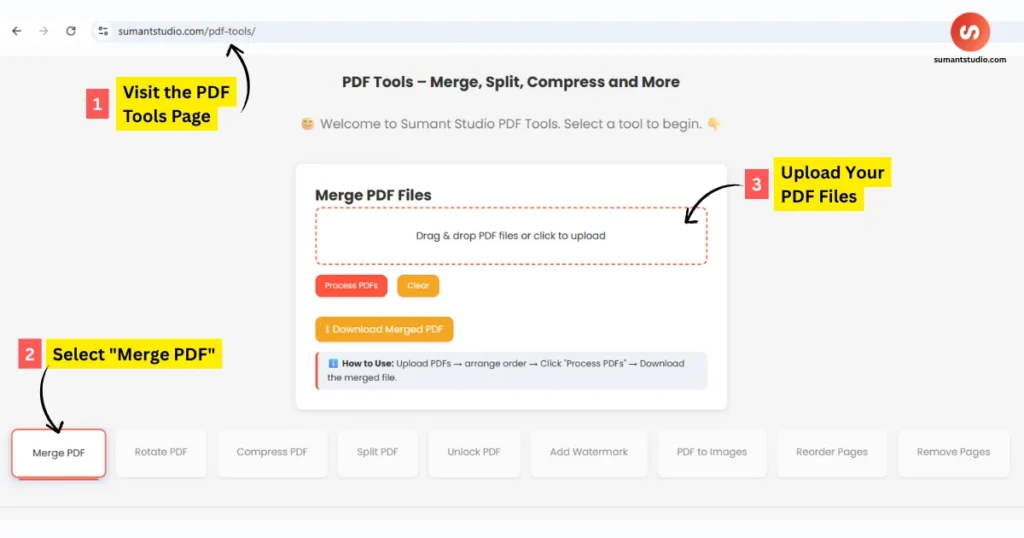
1. Visit the PDF Tools Page
Head to the Sumant Studio PDF Tools page, where a variety of PDF and image-related utilities are hosted for free use.
2. Select “Merge PDF”
Click on the Merge PDF tool from the dashboard. It’s clearly labeled and easily accessible among the other tools.
3. Upload Your PDF Files
Drag and drop your PDF files into the upload area or click “Choose Files” to select them manually from your computer or mobile device.
- Supports multiple PDFs
- No file size limitations for most standard documents
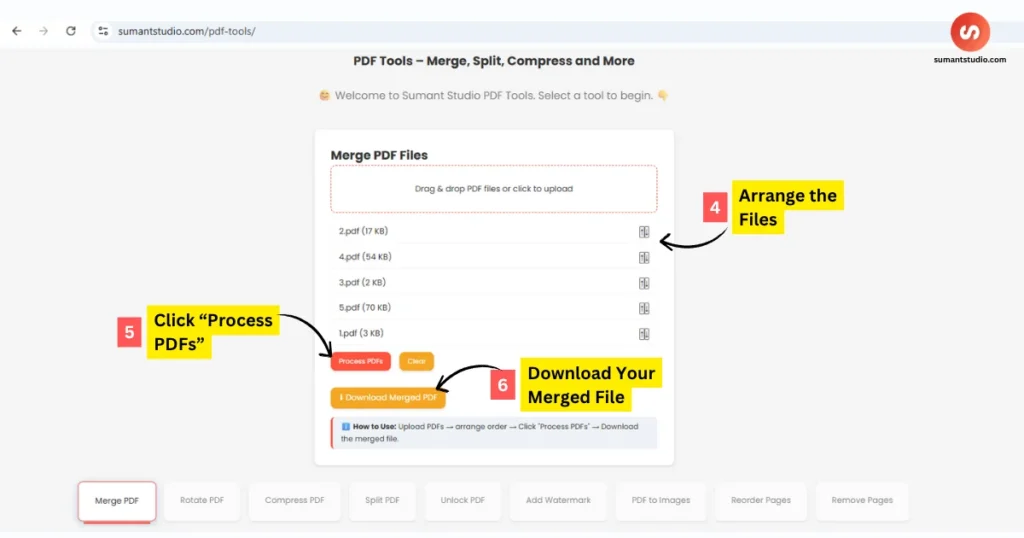
4. Arrange the Files
Once uploaded, you can reorder the PDFs by dragging them into your desired sequence. This ensures that your final document flows exactly how you want it to.
5. Click “Process PDFs”
Hit the Merge button and wait a few seconds. The tool will process your files, combining them into a single PDF.
6. Download Your Merged File
Click on the Download button to save your new, single PDF file to your device. The tool automatically deletes your uploaded files to ensure your privacy.
Advantages of Merging PDFs Online
When compared to traditional software-based methods, merging PDFs online provides:
- Accessibility: Works across all major browsers
- Speed: Instantly available, no installation or updates required
- Usability: Intuitive drag-and-drop interface
- Security: Files are not stored after download
According to Adobe’s official guide on PDFs, PDF files are one of the most trusted formats for secure and universal document sharing.
Benefits of Using Sumant Studio’s Online PDF Merger
Here’s why users love Sumant Studio:
- Free Forever: No hidden fees or subscriptions
- No Sign-up Needed: Get started instantly without an account
- Fast and Secure: Files are processed quickly and securely
- Mobile Friendly: Fully responsive design for phones and tablets
- Environmentally Friendly: Reduces paper usage by enabling digital document management
Sumant Studio also respects your privacy, automatically deleting all uploaded and merged files from its servers shortly after the process is completed.
Real-World Use Cases for Merging PDFs
Understanding how to merge PDFs is especially useful in real-world scenarios:
- Academic Submissions: Combine multiple assignments or research papers into one file for easy uploading
- Business Reports: Merge spreadsheets, presentations, and text documents into a single report
- Legal Work: Consolidate contracts, agreements, and supporting documents
- Creative Projects: Bundle portfolios, design drafts, and references into a single PDF
The ability to merge PDFs quickly helps streamline tasks and boost productivity.
Need More Tools? Compress, Edit & Convert Too
Sumant Studio offers a complete suite of tools beyond just merging PDFs:
- Compress Image Online: Reduce file sizes for faster uploads
- Visit All Blogs: Discover more free utilities and digital productivity tips
These tools help users manage images, convert files, and optimize content for digital use.
Merge PDFs Anytime, Anywhere
With no installation required and full support for modern browsers, you can merge PDF files on any device — Windows, macOS, Linux, Android, or iOS. The platform is optimized for both speed and simplicity.
Whether you’re at home, in the office, or on the move, Sumant Studio PDF Tools make it effortless to manage your documents.
Final Thoughts
Merging PDFs online without software has never been easier. Whether you’re a student handling coursework or a professional preparing contracts, Sumant Studio gives you all the tools you need to simplify and streamline your workflow.
It saves you time, effort, and keeps your documents clean and organized — all from the convenience of your browser.
Start merging now with one click: